By LOTUZBUNTY

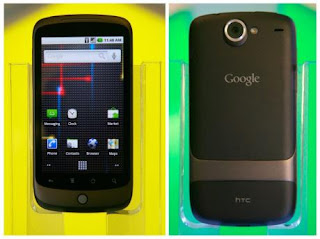
Google has launched its most awaited mobile phone The Nexus One, spurring competition among the smartphone majors. The comparison between googles phone and iphone is as below:
- At $528 (Rs.24,000) google nexus is cheaper than Iphone, which costs $599 (Rs.27,500)
- Its slightly lighter and smaller than Iphone but has bigger screen at 3.7 inches compared with iphones 3.5 inches
- Googles nexus has powerful 1 Ghz processor, compared with iphones 660 Mhz.
- Has organic LED screen, This means better display than the iphone, which has the TFT screen
- has better resolution of 800*480 pixels, compared with Iphones 480*320 pixels
- Has better Camera with 5 Megapixel camera and a led flash, while iphone got only 3 megapixel camera with no flash
- Comes with 4 GB memory, expandable up to 32 GB, while iphone comes with 16 GB and 32 GB non-expandable
- being the google product,it is also built to run all the google applications such as gmail,gtalk,google earth and some parts of world with google voice
- Lacks multi-touch, a feature that has made Iphone popular
But the big Question is whether Nexus one's Operating System is better than Iphone?? better wait and watch
By LOTUZBUNTY
This Video tells us that INDIA is still united ..But the External forces are wrecking its Peace....Every Indian Should Have this Spirit..Enjoy the old bold Muslim...
By LOTUZBUNTY
Hi friends
This is a small post which will help you in posting a image directly into the message body during e-mail in gmail messenger:
1. Sign-in into your gmail email client
2. choose compose mail
3. Then choose the setting option in the right hand top corner of the window , which lies besides your email id
4. Select the LABS option , which will give you many options which are in default disabled by google
5. Enable, inserting images option which is last 4th or 3rd in the option list
6. Save the changes made.
7. Be sure that you have chosen "Rich Formatting Option" in the compose email window.
8. You will then get the picture icon in the standard formatting bar
9.Choose the images you want by browsing your computer drives
10.the image gets pasted in you email body...